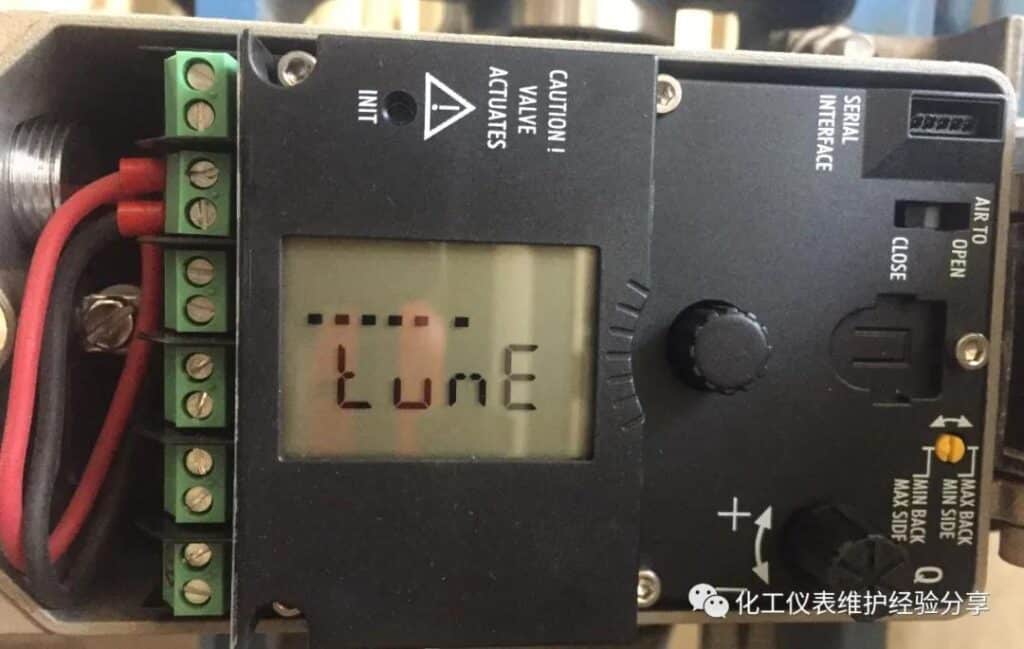
Main Controls
- INIT Button: Recessed button used to start initialization
- AIR TO OPEN / AIR TO CLOSE Selector: Sets the actuator operating direction
- Rotary Pushbutton: Rotate to select; press to confirm
| Step | Procedure |
|---|---|
| 1. Check the Actuator Action | Confirm that the selector matches the actuator action: AIR TO OPEN – increasing air pressure opens the valve. AIR TO CLOSE – increasing air pressure closes the valve. |
| 2. Unlock the Configuration Menu | Rotate the pushbutton to Code 3. Press the button until the code flashes. Rotate to select YES or ON, then press again to confirm. The code should stop flashing. |
| 3. Set the Direction of Action | Rotate to Code 7 and press the button. Select the required direction: Increasing/Increasing – the valve position increases as the input signal increases. Increasing/Decreasing – the valve position decreases as the input signal increases. Press again to confirm. |
| 4. Select the Initialization Mode | Rotate to Code 6 and press the button. Select one of the following modes: |
| NOM – Nominal Range: Recommended for most applications. | |
| MAX – Maximum Range: Initializes the valve over its maximum possible travel. | |
| MAN – Manual Range: Uses a manually selected travel range. | |
| SUB – Substitution Mode: Used when replacing a positioner without performing full initialization. Not recommended for normal commissioning. | |
| 5. Start Auto-Initialization | Press the recessed INIT button using a small screwdriver or suitable tool. The display shows RUN while initialization is in progress. Wait until the procedure is completed and the positioner returns to its normal operating display. |
| 6. Reset the Positioner, If Required | Rotate to Code 36 and press the button. Select std to reset all parameters to factory defaults, or select diAG to reset diagnostic data only. |
Recommended Setting
For standard valve commissioning, select:
Code 6 → NOM → Press INIT
Do not interrupt the air supply or electrical signal during initialization.
For general commissioning context, review how an electro-pneumatic positioner works and then verify positioner error and deadband against the project’s calibration requirements. These references do not replace the applicable SAMSON model manual for code numbers or initialization sequence.